1. Check shutter speed.
Choosing a slow shutter speed in Shutter-Priority Auto or manual mode may cause overexposure.
Adjust exposure by choosing a faster shutter speed. Shutter speed can be adjusted by rotating the main command dial.
2. Check exposure compensation.
Selecting positive values for exposure compensation produces brighter images.
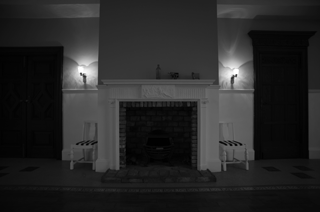 | 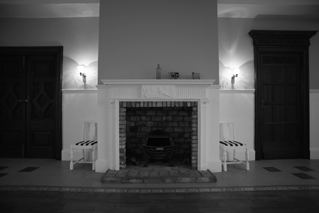 | 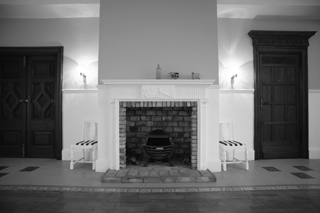 |
| -1 EV | No exposure compensation | +1 EV |
Exposure compensation can be adjusted by holding the exposure compensation button and rotating the main command dial. Camera settings can be viewed in the control panel*, monitor, and viewfinder.
* Applies only to cameras equipped with control panels.
| Exposure compensation button | | | |
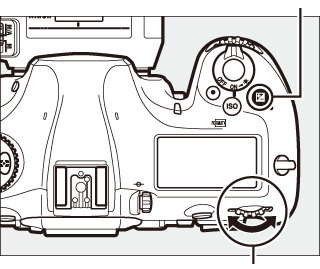 | 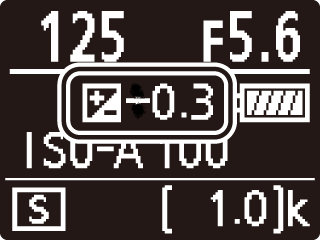 | 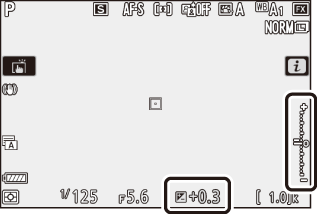 | 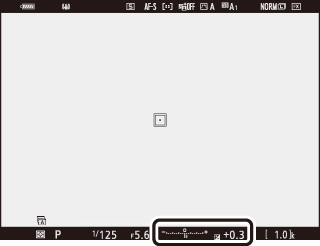 |
| Main command dial | Control panel | Monitor | Viewfinder |
3. Enable auto ISO sensitivity control.
High ISO sensitivities can produce overexposure when lighting is strong.
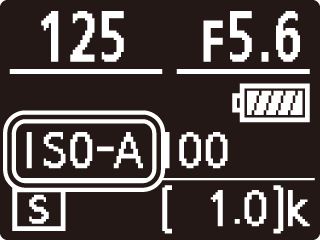
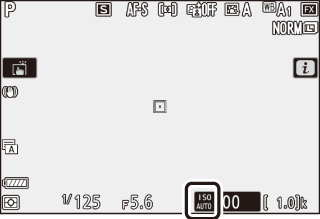
Enabling auto ISO sensitivity control in modes P, S, A, and M allows the camera to adjust sensitivity if optimal exposure cannot be achieved at the selected value.
Auto ISO sensitivity control can be enabled by holding the ISO button and rotating the sub-command dial. Camera settings can be viewed in the control panel*, monitor, and viewfinder.
* Applies only to cameras equipped with control panels.
| Sub-command dial | | |
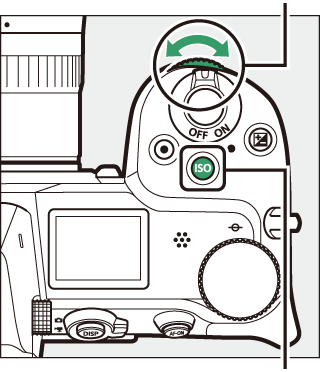 |  |  |
| ISO button | Control panel | Monitor |
4. Check metering.
Matrix metering meters the entire frame, which may result in high-contrast subjects being overexposed.
Matrix metering may result in overexposure if, for example, the background is darker than the main subject.
Choose a metering option that suits your subject.
Metering options can be viewed by pressing the “i” button to display the “i” Menu, highlighting Metering using the multi-selector, and pressing OK.
■ Download User's Manual/Reference Manual
The above guide may not apply or may include functions that differ to your product.
For further details, please refer to the documentation for your product on our download center.
Click here for Download Center
■ If the problem is not resolved
If the above guide did not resolve your issue, please contact Customer Support.
Click here for Customer Support
■ If a repair may be required
If you suspect a malfunction, please return your product for repair inspection at your earliest convenience.
Click here to request a repair
■ Information for Maintenance Service
To maintain optimal performance of your equipment we recommend to have it serviced at regular intervals depending on usage.
Click here for maintenance service
