Nikon cameras offer a range of focus settings, from fully automatic to manual focus options which can be changed to suit the subject matter. Focus problems are thus diverse in nature and can be caused by simple user error or complicated issues related to advanced camera settings. The following are common problems which can cause the subject to be out of focus, they can be split into two categories:
No autofocus operation | Autofocus is operating but not focusing on the subject
If these measures do not resolve your problem please contact our customer support team for further advice.
No autofocus operation
There is no indication that the camera is trying to focus, no sound or movement from the autofocus motor or lens.
|
1. Compatibility of camera and lens
Autofocus will not be possible if the camera and lens are not compatible. The two main reasons for this are:
• When an older lens which does not have autofocus capability (non-CPU lens) is used with a digital camera. These lenses need to be focused manually. Click here to understand the difference between a CPU and non-CPU (manual) lens.
• Digital SLR cameras that do not have an autofocus motor built-in to the camera body are only compatible with the latest lenses which do have the motor built-in. NIKKOR AF-S, AF-I or AF-P type lenses have a built-in motor, other lenses will only focus manually. Click here for further compatibility information.
|
|
2. The camera or lens are not set for autofocus operation
• If your camera has an AF switch (next to the lens bayonet), set it to the AF position.
• Set the lens to A, M/A or A/M position.
|
|
3. There is a camera body/lens communication problem
A poor connection between a camera body and lens can result in no focus when the lens does not receive instructions from the camera.
• Remove and re-attach the lens to the camera making sure the locking pin clicks into place.
• Remove the lens, clean the CPU contacts on the lens and on the camera body with a dry lint-free cloth to ensure they are clean. Check the camera and lens user manuals for the exact location of the contacts.
|
|
4. The lens is consistently not focusing as expected
When all other troubleshooting steps have been checked, if possible, try another lens to confirm if the issue is specific to one lens or not. If both lenses are not focussing as expected it would indicate a possible problem with the camera.
|
|
5. A custom setting is stopping the shutter-release button from working
If AF-ON Only has been set in the custom settings menu or AF-On assigned to the AE-L/AF-L button, autofocus from the shutter release button is deactivated. Set Shutter/AF-ON to enable shutter release from the shutter release button or reset the AE-L/AF-L button to another option.
|
Autofocus is operating but not focusing on the subject
The camera autofocus is trying to work, the autofocus motor and lens are making an operating sound but cannot focus on the subject.
|
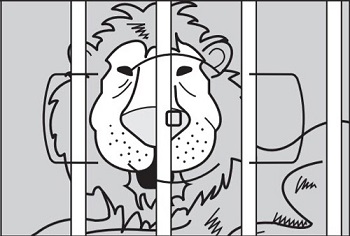
1. The subject lacks contrast, autofocus is intermittent or not possible
Cameras need to detect a certain amount of contrast in the subject to perform autofocus. If the section of the image being focussed on does not have sufficient contrast then the camera will not be able to achieve focus. Try to focus on another part of the subject which contains more contrast.
|
|
|
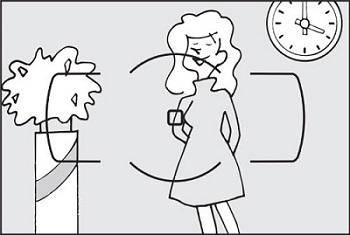
2. The focus point is not on the subject
Cameras with interchangeable lenses allow the focus point position to be moved and set either automatically by the camera or manually by the user. Ensure the focus point in the viewfinder is directly on the subject and half-press the shutter-release button to confirm the subject is in focus. An audible beep can be set to confirm when the subject point is in focus.
• DSLR cameras - the focus point or group is displayed in the viewfinder in red when the subject is in focus. There is no focus point displayed if the subject is not in focus.
• Z series cameras - the focus point or group is displayed in the viewfinder in green when the subject is in focus. The focus point is displayed in red if the subject is not in focus.
• COOLPIX cameras - the focus area is displayed on the camera monitor in green when focus is achieved. The focus area is indicated in red if the subject is not in focus.
|
|
|
3. The subject is closer than the lens minimum focus distance, autofocus is not possible
Lenses have a closest focusing distance to the subject which can range from a few centimetres to metres depending on the lens used and focal length when using a zoom lens. Move away from the subject until you are within the focusing range of the lens. The closest focus distance is indicated on the focus barrel of most lenses or check the user manual.
|
|
4. The subject is too dark, autofocus is intermittent or not possible
• DSLR cameras- select AF-S and set Built-in AF-assist illuminator to On in the custom setting menu (range of approx 1-3 m)
• Z series cameras - select AF-S and set Low-Light AF to On in the custom setting menu.
• Activate the built-in flash or use an external Speedlight.
|
|
5. The subject is moving, images are out of focus
Select the appropriate focus setting on the camera for a moving subject as below. However this can also be caused by a slow shutter speed so if necessary use a faster shutter speed (1/60th sec or above), a higher ISO sensitivity and if necessary use flash.
• DSLR/Z series camera - AF-C (continuous autofocus)
• COOLPIX camera - AF-C or Continuous focus
• If the camera has Scene modes, select a mode which is designed to focus on moving subjects such as Sports mode.
|
However this can also be caused by a slow shutter speed so if necessary use a faster shutter speed (1/60th sec or above), a higher ISO sensitivity to allow faster shutter speed and if necessary use flash.
For further assistance contact Nikon customer support.
