1. Perform image sensor cleaning*.
If black specks appear in pictures, you will need to remove dust from the surface of the image sensor using [Clean image sensor].
Press the Menu button, select Clean image sensor in the Setup Menu, highlight Clean now, and press OK.
The camera will check and clean the image sensor.
* Applies only to models with image sensor cleaning.
2. Clean the image sensor using a blower.
Foreign matter that cannot be removed from the image sensor via image sensor cleaning* can be removed with a blower.
Blow dust and lint from the sensor using a blower not equipped with a brush.
* Applies only to models with image sensor cleaning.
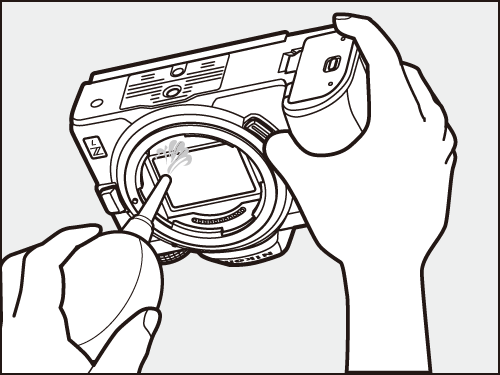 |
When using a blower, choose one that is not equipped with a brush, as the bristles could damage the sensor. Dirt that cannot be removed with a blower can only be removed by Nikon-authorized service personnel. Under no circumstances should you touch or wipe the sensor.
3. Clean the lens.
After using a blower to remove fine lint and dust from the surface of the front and rear lens elements, wipe them gently with a cleaning cloth*. Wiping the lens without first removing dust or lint could scratch the lens surface.
* Lens cleaning cloth: a cloth used to remove dust or lint from the camera and lens.
■ Download User's Manual/Reference Manual
The above guide may not apply or may include functions that differ to your product.
For further details, please refer to the documentation for your product on our download center.
Click here for Download Center
■ If the problem is not resolved
If the above guide did not resolve your issue, please contact Customer Support.
Click here for Customer Support
■ If a repair may be required
If you suspect a malfunction, please return your product for repair inspection at your earliest convenience.
Click here to request a repair
■ Information for Maintenance Service
To maintain optimal performance of your equipment we recommend to have it serviced at regular intervals depending on usage.
Click here for maintenance service
