1. Check that the lens is correctly attached
The failure of the camera to detect the lens might be due to a poor connection between the signal contacts on the camera and lens preventing the exchange of data. Given this possibility, turn the camera off and remove the lens. Without turning the camera on, align the mounting marks on the camera and lens (①) and rotate the lens counterclockwise (②) until it clicks into place as shown in the illustration below. Turn the camera on again after reattaching the lens.
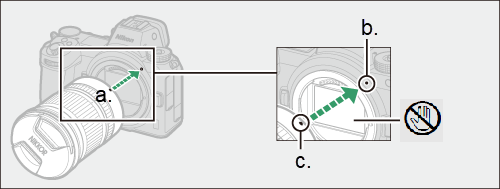 |
a. Align the mounting marks
b. Mounting mark (camera)
c. Mounting mark (lens) |
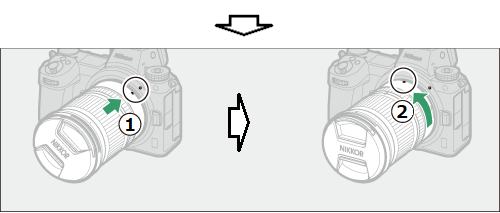 |
| Rotate the lens as shown above until it clicks into place |
2. Check for dirt on the camera and lens signal contacts
Turn the camera off, remove the lens, and wipe the camera and lens signal contacts with a clean, dry cloth. When cleaning the camera signal contacts, be careful not to touch the image sensor or allow foreign matter into the camera. Similarly, when cleaning the lens signal contacts, be careful that foreign matter does not find its way onto the lens. If you are uncertain as to how to proceed, contact Nikon customer support.
3. Check whether the camera detects other lenses
If you have other lenses, try attaching one of them to see whether it is detected by the camera. If it is, the fault may lie within the lens which is not recognized. In this case, please contact Nikon customer support.
4. Check for warnings or messages
When using an extendable lens, if the lens barrel is retracted when the camera is turned on, an error message will be displayed. Follow the on-screen instructions, rotate the zoom ring as shown below until the lens clicks into place in the extended position.
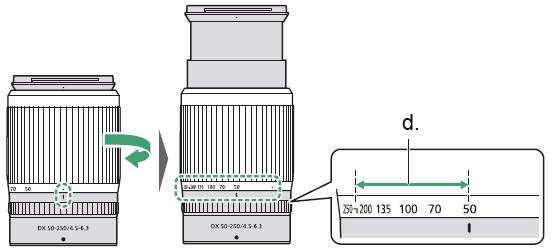 |
| d. Pictures can be taken at these focal lengths |
■ Download User's Manual/Reference Manual
The above guide may not apply or may include functions that differ to your product.
For further details, please refer to the documentation for your product on our download center.
Click here for Download Center
■ If the problem is not resolved
If the above guide did not resolve your issue, please contact Customer Support.
Click here for Customer Support
■ If a repair may be required
If you suspect a malfunction, please return your product for repair inspection at your earliest convenience.
Click here to request a repair
■ Information for Maintenance Service
To maintain optimal performance of your equipment we recommend to have it serviced at regular intervals depending on usage.
Click here for maintenance service
